

Most IPTV subscriptions run $10 to $20 a month for a solid, reliable service, with budget options dropping to $3-$10 on prepaid annual plans and premium packages climbing to $20-$40 or more for 4K, multiple connections, and heavy sports coverage. If you’re testing the waters, start month-to-month or run a 24-hour trial first. If a provider has already proven itself stable on your devices, an annual plan gets you the same content for less per month.
The math matters more than the sticker price. A service advertised at $25/month sounds worse than one at $8/month until you realize the second one is billed annually and locks you in for a year with no refund if the stream buffers every night during primetime.
Before you commit to anything, budget for the extras that quietly change your real monthly cost:
-
A VPN, if your ISP throttles streaming traffic or you want privacy (commonly $2-$5/month)
-
A streaming device like a Firestick or Android TV box if you don’t already own one
-
Extra simultaneous connections if more than one person in your household watches at once
-
Payment processing quirks, since some providers charge more for card payments than crypto
Key Takeaways
The single biggest lever on your real IPTV cost isn’t the sticker price, it’s whether you verify stability before prepaying for a longer term.
| Point | Details |
|---|---|
| Typical monthly cost | Standard plans run $10-$20/month, with budget options near $3-$10 and premium tiers at $20-$40+. |
| Prepaid plans lower effective cost | A 12- or 24-month plan can push effective monthly cost down toward the $8-$12 range. |
| Test before committing long-term | Run a 24-hour trial during primetime hours before choosing an annual plan over month-to-month. |
| Budget for hidden extras | Factor in a VPN, a streaming device, and possible payment fees on top of the subscription price. |
| Prioritize stability over channel count | Uptime and support responsiveness matter more than raw channel numbers when judging value. |
| Buyiptvfor4k covers the full range | Offers monthly-to-annual plans, 4K streaming, multi-device support, and a money-back guarantee. |
Table of Contents
How Much Is IPTV Per Month? Realistic Price Bands
IPTV pricing splits into three rough tiers, and knowing which one you’re actually shopping in saves you from comparing apples to oranges.
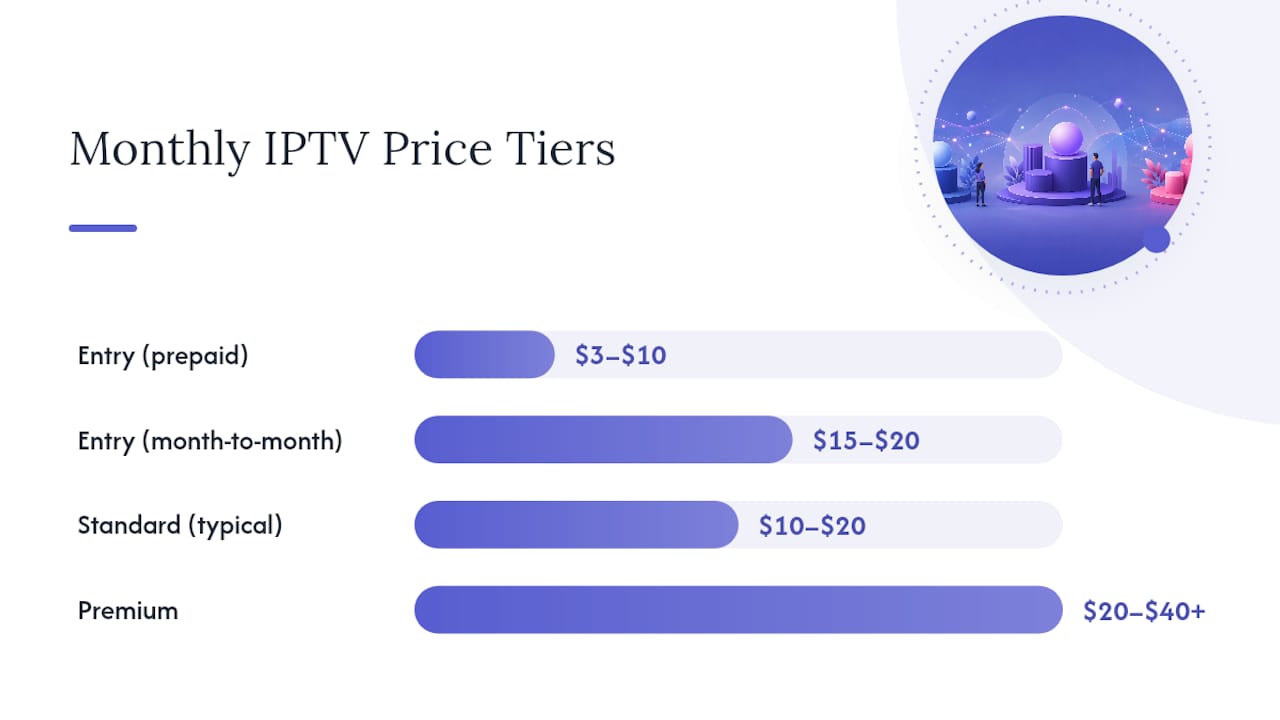
Entry-level plans ($3-$10/month effective rate) typically include a solid live TV channel lineup, basic VOD, and one or two connections. You’ll usually get HD as the default with 4K available on select content. These prices almost always require a 6-, 12-, or 24-month prepaid commitment. Pay month-to-month and the same plan often costs closer to $15-$20.
Standard plans ($10-$20/month) add a bigger VOD library, catch-up TV, multiple simultaneous streams, and more consistent 4K support. This is where most established providers, including Buyiptvfor4k’s mid-tier packages, sit. One widely cited aggregation puts the average IPTV service around $15.40 a month, which lines up with what you’ll find across the standard tier.
Premium plans ($20-$40+/month) target households that want everything: full regional channel packages across multiple countries, four or more simultaneous connections, dedicated 4K/8K streams, and priority support. Sports fans and multi-device families tend to land here.
Here’s where prepaid billing changes the math. A provider charging $19.99/month sounds pricier than one advertising “$79.99 for 6 months,” until you divide:
-
3-month plan at $45 → $15.00/month effective
-
6-month plan at $79.99 → $13.33/month effective
-
12-month plan at $139.99 → $11.67/month effective
-
24-month plan at $199.99 → $8.33/month effective
The pattern holds across the industry: longer commitments reliably push effective monthly cost down, sometimes into the $3-$10 range for entry-level packages once you spread the total over 12 or 24 months. That’s a real discount, not a marketing trick, but it only pays off if the service is actually stable for the length of the contract you’re buying.
Compare that to what most households already pay. A typical cable or bundled streaming setup can run $80 to $200 a month, and that’s before add-on channels or DVR fees. Even a mid-tier IPTV plan at $15/month is a fraction of that, which is the real reason the category has grown the way it has.
What Actually Drives the Price of an IPTV Plan?
Channel count is the number providers advertise loudest, and it’s the one that matters least. A package boasting “45,000 channels” is meaningless if 30,000 of them are dead regional feeds you’ll never watch. What actually separates a $10 plan from a $30 plan is infrastructure and content quality, not raw quantity.
-
Channel relevance, not channel count. A curated lineup with your regional sports networks and the premium channels you actually watch beats a bloated list padded with filler.
-
Stream quality and the server investment behind it. Real 4K delivery requires better CDN infrastructure and bandwidth than SD, and that cost shows up in the price.
-
VOD library size and catch-up TV accuracy. A 160,000-title on-demand library with working catch-up windows costs more to license and maintain than a thin one.
-
EPG accuracy. A guide that’s wrong half the time is worse than no guide at all, and getting it right takes ongoing work on the provider’s end.
-
Simultaneous streams and device support. Paying for two connections instead of one, or wanting Apple TV support alongside Firestick and Android, moves you up a tier.
-
Reliability and support responsiveness. This is the factor most buyers underweight and most guides underexplain.
Pro Tip: Don’t judge a plan by its channel count screenshot. Ask instead how many of the top 20 channels you personally watch are included, and whether the provider can name their average uptime.
Experts and long-time users tend to agree on one thing: prioritize stability and support over the cheapest sticker price. A $6/month plan that buffers every Sunday during football isn’t cheap. It’s a $6/month plan you’ll cancel by week three and then pay for again somewhere else.
Should You Pay Monthly or Commit to an Annual Plan?
The commitment length you choose changes your effective cost more than almost any other single decision, so it’s worth thinking through deliberately rather than defaulting to whatever billing option is pre-selected at checkout.
Annual and multi-month prepaid plans exist because providers want cash flow and lower churn, and they pass some of that savings to you. The downside is real: most IPTV providers don’t offer prorated refunds mid-contract, so if a service degrades in month four of a 12-month plan, you’ve already paid for eight more months you may not use.
Month-to-month billing costs more per month but gives you an exit. It’s the right call in three situations:
-
You’re new to a provider and haven’t verified the stream holds up on your specific router, ISP, and streaming device.
-
Your household’s viewing needs are in flux (moving, changing devices, adding or dropping members).
-
You’ve already been burned once by a prepaid plan that didn’t deliver.
The smarter middle path most guides agree on: run a 24-hour trial during your actual primetime viewing hours before paying for anything longer than a month. That short window, ideally on the exact device and connection you’ll use nightly, tells you whether a provider can handle peak-hour load. If it holds up, then the annual plan’s lower effective rate becomes a genuine deal instead of a gamble. If it stutters, you’ve lost nothing but a day.
Hidden Costs That Change Your Real Monthly Bill
The advertised subscription price is rarely your full monthly cost. Budget for what’s not on the label before you compare plans side by side.
A VPN is the most common add-on, and a lot of IPTV users treat it as close to mandatory, both for privacy and to avoid ISP throttling on streaming traffic. Budget VPN services typically run $2 to $5 a month, and one widely referenced breakdown pegs a realistic combined total, IPTV plus a low-cost VPN and minor extras like an anonymous email address, at close to $20 a month once everything is added up.
Hardware is usually a one-time cost, but it’s easy to forget when comparing monthly rates. A Firestick or Android TV box runs roughly $30 to $60 depending on the model, and if you’re outfitting more than one TV, that adds up fast on day one even though it never appears in a “per month” comparison.
-
VPN subscription: $2-$5/month, often bundled or discounted through the IPTV provider
-
Streaming device: $30-$60 one-time, per TV that doesn’t already have smart capability
-
Extra simultaneous connections: often $2-$5/month more per additional stream
-
Payment processing fees: card payments can carry higher fees than other methods for the provider, which sometimes gets passed along
Payment method matters more than most buyers expect. Card processors treat IPTV as a higher-risk category, which affects fees and chargeback exposure for providers, and some providers now accept crypto partly to reduce that friction and partly because privacy-conscious customers prefer it. If a provider only takes crypto with no alternative, that’s worth a second look. If it’s offered as one option among several, it’s usually just a lower-fee convenience.
How to Choose an IPTV Plan Without Overpaying
Work through this checklist before you hand over a card number or wallet address.
Start with what you actually need, not what sounds impressive. How many hours a week does your household stream? Do you need live sports with low latency, or is on-demand content enough? How many devices will connect at once, and do any of them require true 4K rather than upscaled HD?
-
How long is the free trial, and does it run at least 24 hours?
-
What’s the refund policy if the stream doesn’t hold up after purchase?
-
Which devices and operating systems are officially supported?
-
How many simultaneous connections does the plan include, and what does adding more cost?
-
Can the provider share any uptime statistics or server stability data?
Red flags should end the conversation immediately: no trial offered at all, no way to contact support before you pay, vague or shifting payment terms, or channel-count claims that sound too good to check. Community reports consistently note that the cheapest sellers often cut corners on server infrastructure, which is exactly where downtime comes from.
Pro Tip: Ask a provider directly what their average uptime has been over the last 90 days. A provider with nothing to say, or an answer that’s suspiciously vague, is telling you something.
Trust signals worth weighing in the other direction: a trial with clear terms, published or discussed uptime figures, and support that answers a pre-sale question quickly and specifically instead of with a canned script.
What Should You Budget Based on Your Household?
Match your viewing habits to a realistic target before you start comparing plans, because the “best” price depends entirely on what you’re using it for.
-
Casual viewer, one TV, mostly on-demand and network shows. Budget $8-$15/month on an annual plan. You don’t need four connections or 8K, so paying for them is wasted money.
-
Sports fan who needs live games without buffering. Budget $15-$25/month. Low latency and reliable server capacity during peak hours matter more here than anywhere else, and that reliability tends to cost more.
-
Family household with three or more devices streaming at once. Budget $20-$35/month for a plan with four or more simultaneous connections. Splitting this across a household of four still beats separate individual subscriptions.
-
Multi-region household wanting UK, US, and other international channels together. Budget $25-$40/month, since broad regional coverage is one of the few features that legitimately raises the base price rather than just padding a channel list.
Set against a typical cable bill or a stack of three or four individual streaming subscriptions, even the top end of that range usually comes in well under what most households already pay for less content.
What Buyiptvfor4k Offers at Each Price Point
Buyiptvfor4k builds its plans around the same value factors that actually matter: stability, device support, and content depth, rather than an inflated channel number on a landing page.
-
Access to over 45,000 live TV channels and a 160,000-title VOD library across UK, US, European, and Asian regional catalogs
-
4K, HD, and SD streaming with anti-freezing technology built to hold up during peak viewing hours
-
Catch-up TV and an EPG so you can find and replay what you missed without guessing
-
Compatibility across Smart TVs, Firestick, Android, iOS, MAG devices, tablets, PCs, and Apple TV
-
Subscription lengths from monthly to annual, plus flexible payment options including crypto
-
A money-back guarantee and setup support if you run into trouble connecting a device
Which Plan Should You Actually Start With?
Reliability beats the lowest sticker price every time, and readers who skip straight to the cheapest listed number tend to end up paying twice, once for the bad service and again for the one they switch to after canceling.

My honest read after digging through how this pricing actually works: most people should run a 24-hour trial during a normal primetime viewing hour before spending a dollar on anything longer than a month. Test it on the actual device you’ll use nightly, not a spare tablet sitting in a drawer. If it holds up under real conditions, that’s your signal to move to an annual plan and capture the better effective rate. If it doesn’t, you’ve lost a day, not a year’s payment.
The number that should worry you isn’t the monthly price. It’s whether the provider can tell you their own uptime.
— ANASS
Why Buyiptvfor4k Is Worth Comparing Before You Commit
If you’ve been running the math on effective monthly cost, VPN add-ons, and hardware, Buyiptvfor4k is built for exactly the comparison you’re doing right now. It fits three kinds of readers especially well: households that want genuine 4K rather than upscaled HD, multi-device homes that need several simultaneous connections without paying for separate accounts, and anyone who wants to check a real channel list and setup guide before paying instead of taking a sales page’s word for it.
The plan structure runs from monthly to annual, so you can start short and test stability before locking in the better per-month rate on a longer term. Payment flexibility includes crypto alongside standard methods, and every plan carries a money-back guarantee, which matters more than any feature list once you’ve read enough about providers that vanish after a bad billing cycle. Anti-freezing technology and multi-region catalogs across the UK, US, Europe, and Asia round out what you’re actually paying for.
Check the channels list to confirm your regional networks are covered, review the setup guide for your device, and then start a plan on the Buyiptvfor4k landing page to see current pricing across all durations.
Sources
-
IPTV Subscription Cost Guide 2026: Pricing & Best Plans | Differ
-
Cheapest IPTV Subscription USA 2026 – Best Plans From $2.92/Month – On Pattison